


First, check that you both want to call

You can request a call from the other person’s profile. Before sending, check the points and conditions displayed on the screen. Then wait for their acceptance.
Received requests appear in the Calls tab under Schedule. Accepting lets you both choose available times. Chat acceptance and call acceptance are separate.
Select several times that work for you
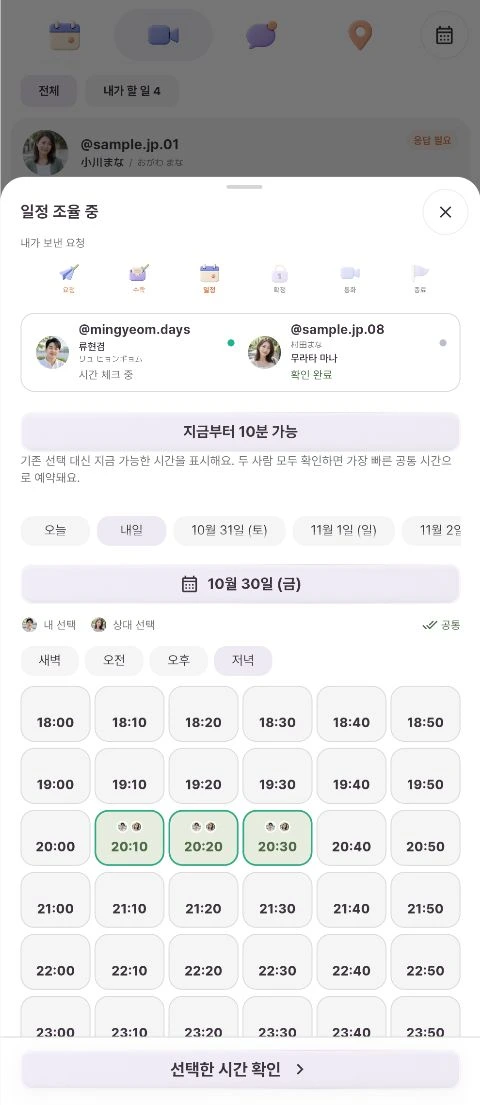
Choose a date and part of the day, then check the times when you can call. Offering several options makes it easier to find a suitable time.
The screen distinguishes your choices, their choices and shared times. When you finish, press the time confirmation button at the bottom.
Both confirmations make an appointment
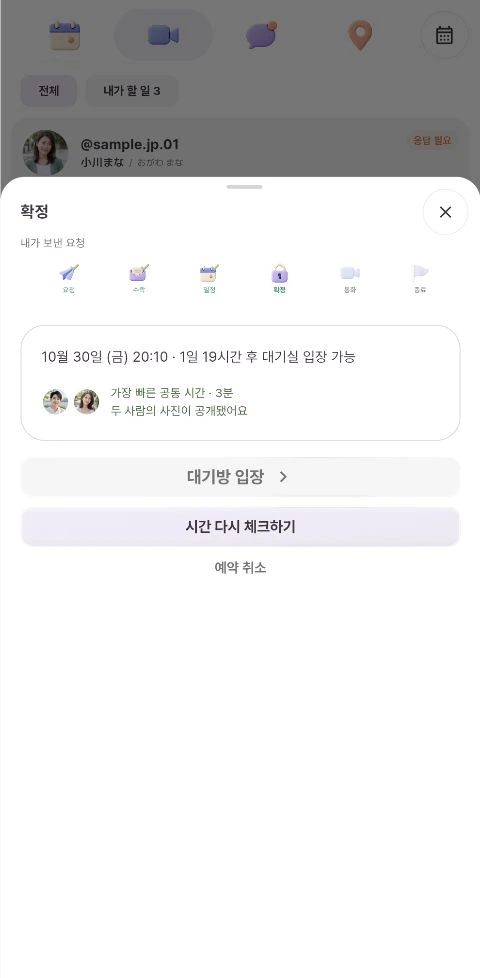
Once both people confirm their choices, the earliest shared time is booked. This test appointment was confirmed for October 30 at 20:10. Selecting times and completing confirmation are separate steps.
Check the date and time on the confirmation screen. To reconsider your availability, use the button to check times again.
Start with a simple hello
The confirmation screen shows when you can enter the waiting room. Use the waiting room button once entry becomes available.
A video call lasts three minutes from the start. You do not need a long list of topics. Try something you already shared, such as “I saw your day today.” Speak slowly so the other person can comfortably join the conversation.